ProcessWORKAboutbook a call
Home
About
Portoflio
Gallery
blog
Contact
FacebookFacebook
TwitterTwitter
InstagramInstagram

Color Confidence
— from Pre-to-Post

A complete color pipeline for Commercial Directors. Built in prep. Calibrated on-set. Refined in post.


BOOK A CALLSEE THE WORK

Post-Color
— Front-Loaded

Most projects treat color like a post-production deliverable. We treat it like a pre-production decision. A Show LUT, built alongside your DP in prep. Calibrated SmallHD monitors that carry it on-set. A calibrated iPad on your desk for Live remote color sessions. A final color grade that locks it in. Same color, pre-to-post.

One Show LUT
— From Prep to Final Grade

Alongside your DP, we build a custom Show LUT. Your creative intent, baked in before you step on set. Your client sees the color from your pitch deck. That same LUT travels with your footage from dailies, through the edit, to the final grade. Your color stays consistent and true. No generic LUTs. No surprises. Just your color.

Color Accuracy
— in Video Village

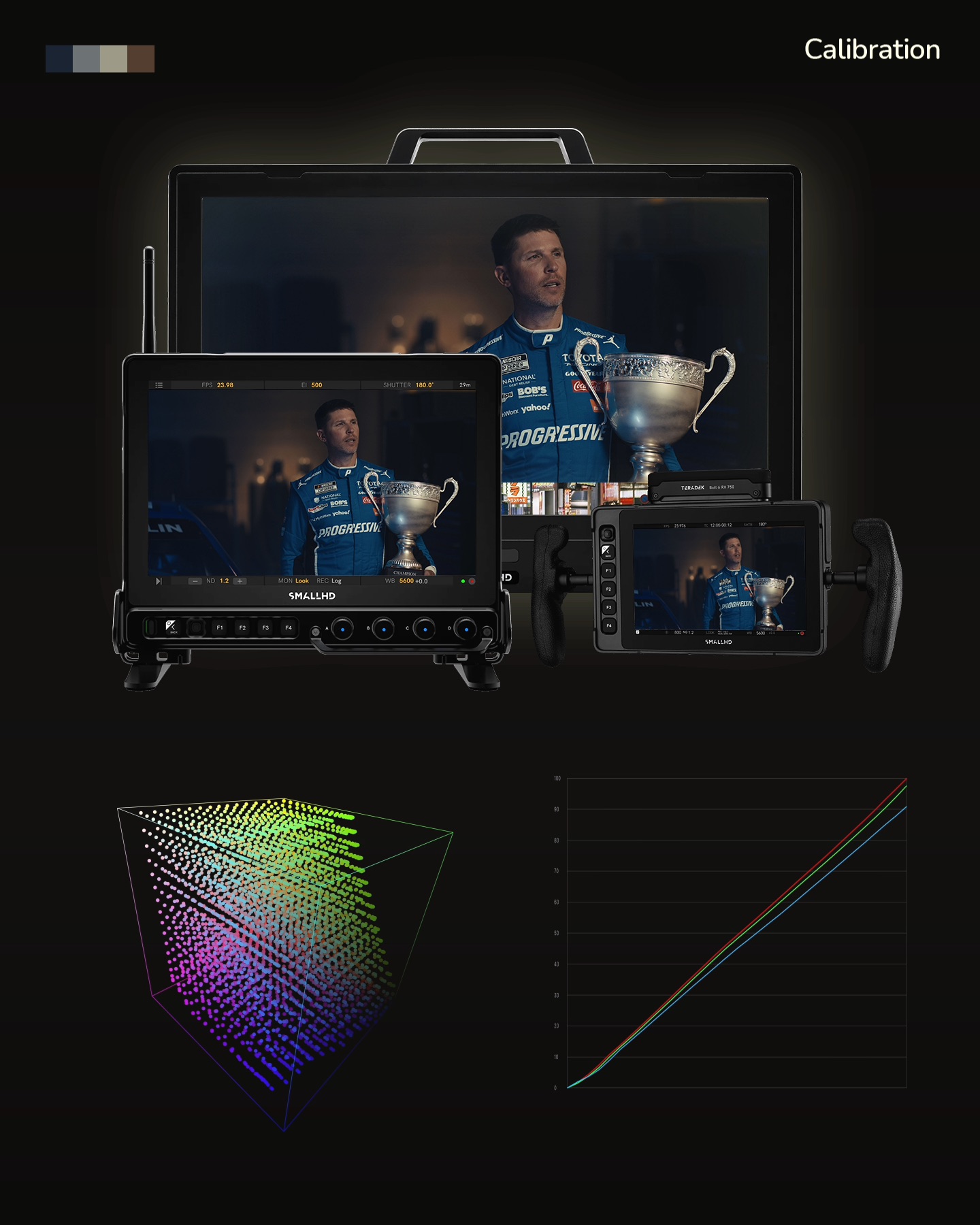
After the work we put into designing your Show LUT in pre-production, the last thing you want is a monitor that can't show it accurately. We remotely calibrate your SmallHD displays before you hop on set with a kit shipped to you, your DP, or rental house. Full color confidence — for you, your DP, your client. No more "which monitor is right?" Same image, every screen.

Your Final Grade — From My Studio to Yours

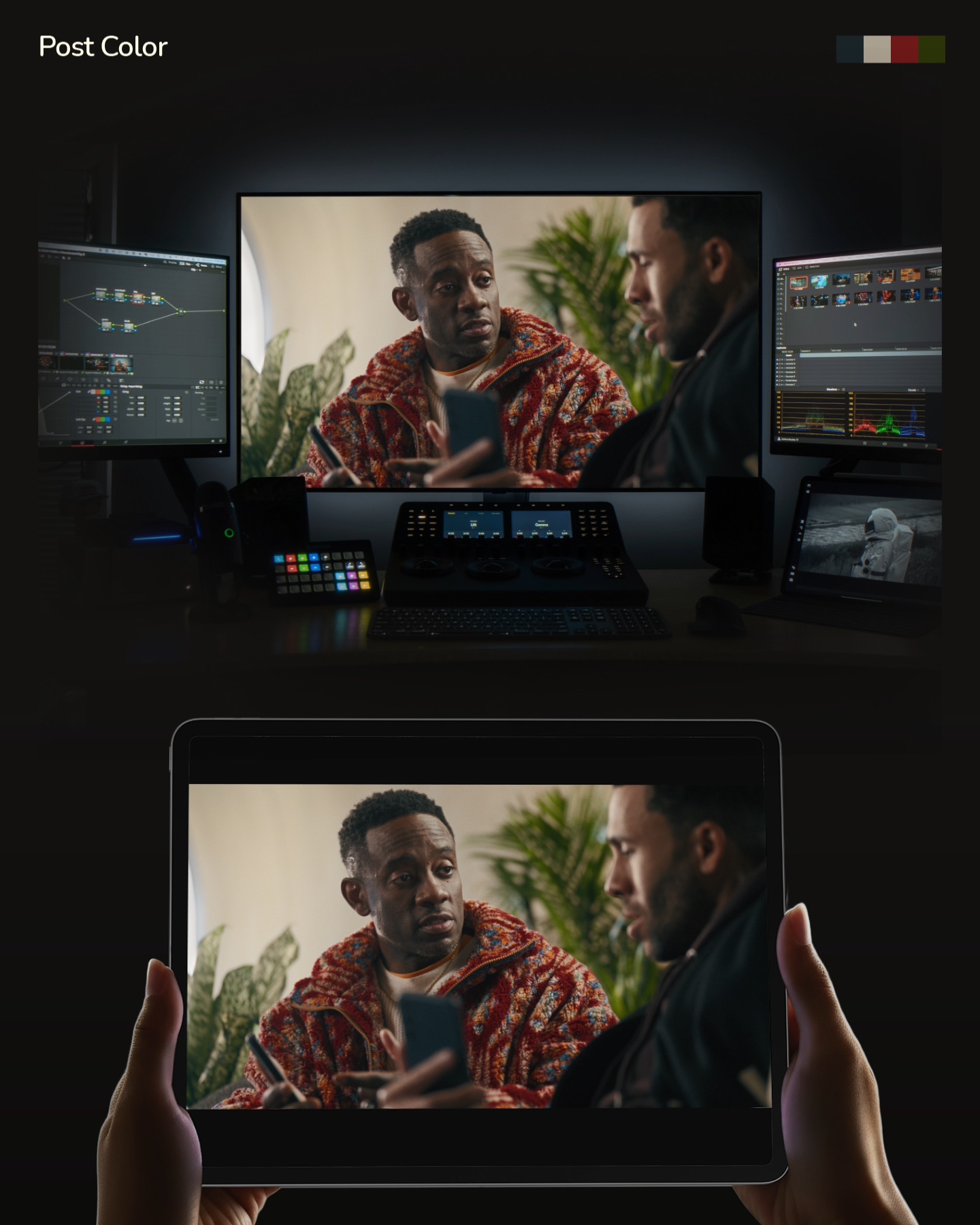
The pre-production work pays off in the final grade. A calibrated iPad ships to you, your DP, or your client — with hassle-free return shipping. Same color accuracy as my studio, no matter where you are. We build upon our Show LUT while focusing on shot consistency and brand colors, without extending your post-production timeline. Full color confidence — wherever you're watching from.

What You Get

LUT + Final Grade

A fully remote color grade, anchored by your pre-production Show LUT. Flat-rate pricing within your budget and deadline. No surprises.

Remote Calibration

A custom calibration kit shipped to you for your SmallHD. Your monitors are dialed in before you hop on set. Your crew and client's expectations are synced on the day.

Calibrated iPad

A calibrated iPad ships to your desk in post. Same color accuracy as my studio, in your hands. Color turns your locked edit into a finished piece.

Client Confidence

A Colorist is your insurance policy. What your client approved in your pitch deck is what everyone will experience in post. This project leads to the next.

What You Get

Show LUT + Final Grade

In the end, expect a fully color-graded project, enriched by a pre-production Monitoring LUT, all within your budget and final deadline.

Consistent Clientele

First-time clients quickly become reoccurring contacts, all because they see that you have their best interest in mind. Brand colors remain true-to-brand, even in the midst of your creative color palette.

Marketable Portfolio

Distinguish your portfolio from your competitors to fuel your marketing strategy. Work with ideal Producers, DP’s, or more premium clients and brands. Catch their attention and solidify their confidence.

Assurance in Post

As production wraps, your DP and crew have full confidence that their creative decisions are accounted for in a single Show LUT, even if they’re not a part of the post-production process.

Calibrated tools. Confident clients. Color graded.
Let's talk.

BOOK A CALLSEE THE WORK

The Capture-to-Color Pipeline
— a 3-Step Process

Built in prep. Calibrated on-set. Refined in post.
STEP 1 — THE BUILD

Crafting your swatches in “pre”

  • Define your project's "look" in a creative session — pulled from your pitch deck, visual references, and client brand guidelines.
  • Design your custom Show LUT in a one-hour remote session — tuned to your camera package, visual references, exposure preferences, and shooting environments.
  • Calibrate your SmallHD monitors remotely — kit shipped to you with detailed setup videos, then a live session to dial in a calibration LUT specific to your display (Delta E under 2.3). Your monitor stays with you the entire time.

STEP 2 — THE PRODUCTION

Infusing your color on-set

  • Your Show LUT loads onto every calibrated SmallHD on-set — Director's monitor, DP's reference display, video village.
  • Your client watches their pitch-deck colors come to life in real time — not in a final-grade reveal weeks later.
  • Prep day feedback lets us refine your Show LUT before cameras roll — without disrupting your production schedule.

STEP 3 — THE REFINERY

Maximizing your palette in “post”

  • A calibrated iPad (Delta E under 1.0) ships to your location for live remote sessions. Same color on your screen as in my studio. Return shipping included.
  • Three initial "Looks" are built to further your production's visual aesthetic. Fail fast, find the right direction, and save the precious time in post for client feedback.
  • Shot-to-shot consistency across every camera, environment, and production day.
  • Brand and memory colors remain accurate, while problematic shots get rescued in post.

One pipeline. Three steps. No surprises.
Let's chat.

BOOK A CALLSEE THE WORK

Maximize your Negative
— Push it in Post

What our LUT can't do alone. The LUT carries your look; the grade dials it in.
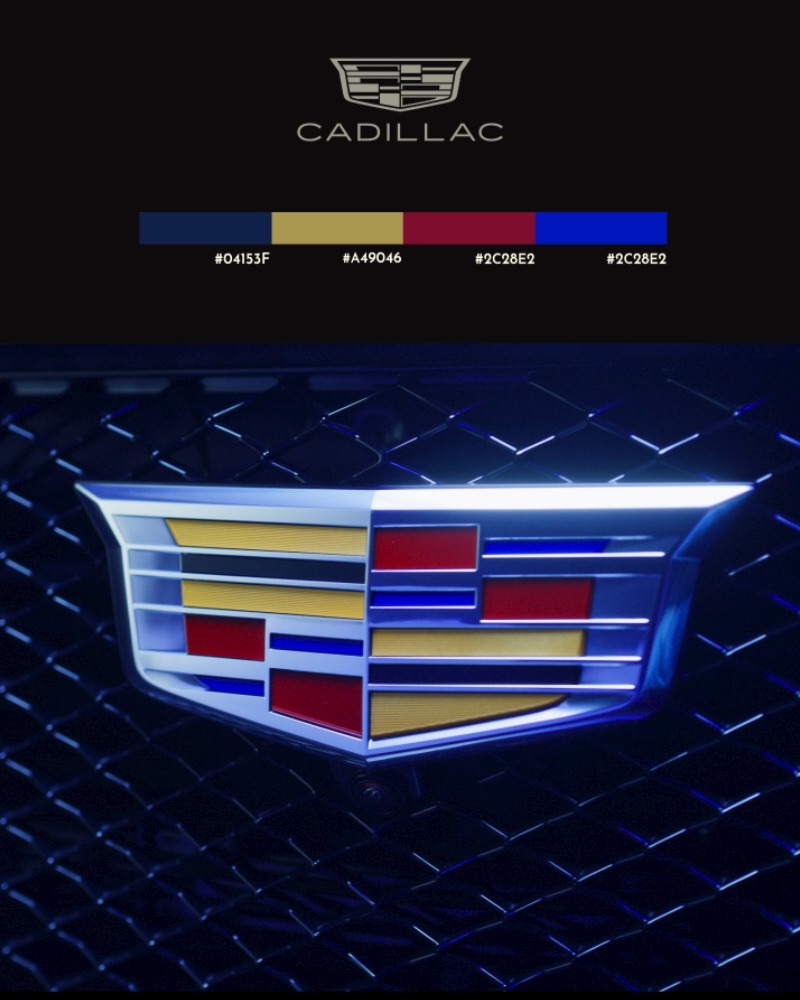
Dial in your client’s color palette and brand guidelines

Hex code: #F40009 – "Coca-Cola Red".
Brand colors stay accurate to your client's style guide. Every shot, every deliverable.

Create consistency and visual flow, from shot-to-shot

Multiple cameras, multiple locations, over multiple days. Shot consistency across your entire project. One continuous campaign.
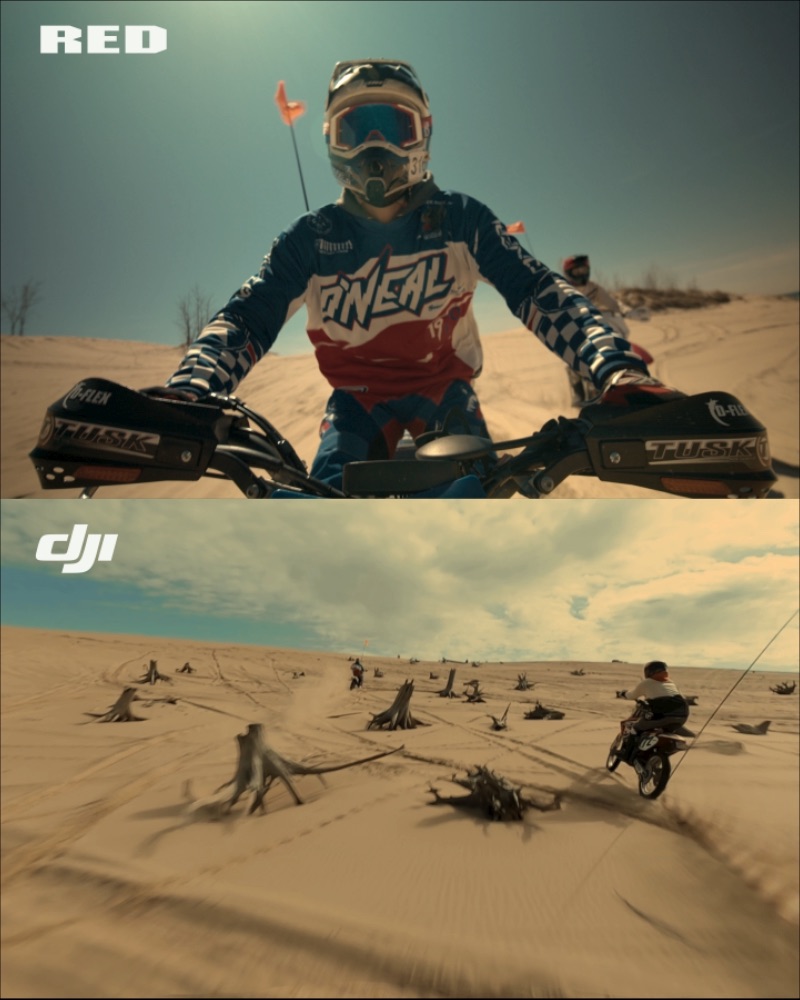
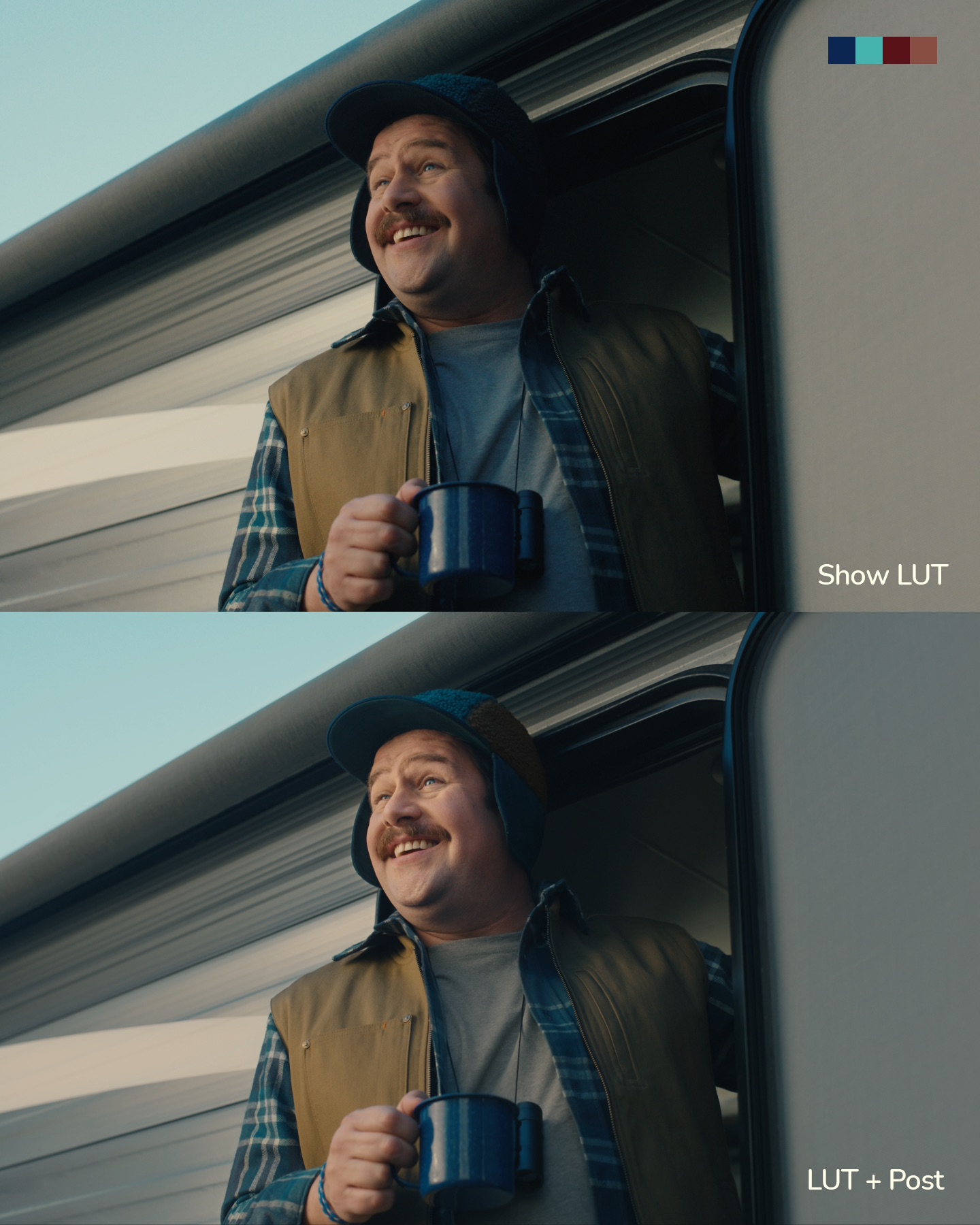
Dial in the detail you couldn't catch on set

Production moves fast and details get missed. Custom qualifiers, vignettes, object masks, noise cleanup — the selective work our LUT can't do alone.

Shots matched. Color locked.
Let's talk.

BOOK A CALLSEE THE WORK

Common Questions
— Honest Answers

These are the ones I get most. Yours is probably in here.

When the grade is complete, what files will I receive back?

Final grades deliver in ProRes 4444 XQ. Two workflow options:

"Source Media Workflow" — individually graded ProRes clips, each with 24-frame handles.

"Flat Quicktime Workflow" — one single graded ProRes of your entire project. No frame handles in this workflow.

I provide step-by-step instructions on how to prepare your initial timeline.

What's included in a SmallHD monitor calibration?

SmallHD displays get a full 3D LUT calibration, verified with Light Illusion ColourSpace.

  • Calibration target: Rec. 709, Gamma 2.4, D65 white point, Delta E < 2.3 (monitor-dependent).
  • The kit ships with everything needed — PC laptop (we remote into it), colorimeter, spectrophotometer, test pattern generator, and all cables.
  • Arrives 1-2 days before our call.
  • Pre-paid UPS return label and a before-and-after PDF report included.

Time commitment:

  • 15–20 minute setup with video tutorials.
  • 30 minute kickoff call.
  • 1–2 hours of remote calibration per monitor while you step away.

What if I don't need a monitor calibration, but just want you to grade my project?

Not everyone needs one. Calibration is a solid bonus — most useful when you're heading into production and want your on-set displays dialed in.

If you're already in post and just need a grade, we skip it. It's here when you need it. Just reach out.

Do you calibrate any other monitors other than SmallHD?

SmallHD is our only fully-supported option. Their LUT calibration menu makes the remote workflow seamless and user-friendly.

Other brands can be calibrated with limitations:

  • Flanders DM and XMP Series — using GaiaColor AutoCal, verified with ColourSpace
  • Atomos — using their free proprietary software, verified with ColourSpace
  • DJI High-Bright Remote Monitor

For anything not listed (legacy Flanders models, other manufacturers), reach out. Not every monitor calibrates remotely, but we'll let you know what's possible.

What if I have changes to our custom Show LUT?

A Prep Day is the ideal time for Show LUT changes.

It gives us room to gather feedback, adjust, and re-export LUT files for every camera — with variations to account for exposure shifts and any environmental changes we didn't catch in pre-production.

Without a Prep Day, mid-production adjustments risk holding up your schedule, and a swift turnaround isn't guaranteed.

If you can access your camera at the rental house or work with an owner/operator, this testing can happen well before production.

How does this LUT workflow apply to my DIT?

DITs speak the language of a Colorist. This workflow is nothing new to them, and having one onboard brings real control to your production when I can't physically be on set with you.

Introduce us early in pre-production, and I'll make sure they receive all assets we build together.

How long will a post-production color grade take?

Final grade timelines depend on a few factors:

  • Prepping your project file and raw footage
  • Project length and total deliverables
  • Feedback rounds (up to 3 revisions included)

Commercial campaigns, short films, feature-length documentaries — they all have different timelines to consider. Reach out directly and I'll share my rate sheet and give you a quick estimate.

What files do you require to build a Show LUT?

Building a Show LUT translates your camera's color space into your specified palette — tested across multiple lighting scenarios to make sure all values hold.

My raw footage library covers most cameras, color spaces, and lighting scenarios. Not to mention, any previous Log footage your DP has captured in the past is even more valuable.

Reference imagery sets the creative intent: Shot Deck pulls, Midjourney references, your client's brand guidelines, video links, mood boards. Anything visual is useful.

What can I expect from a Live remote color session in post?

Full access to the color process, in real time. Sessions come in 1, 2, or 3-hour blocks, scheduled around you and your team. Your client, director, creative agency — whoever needs to be in the room — joins the call.

A calibrated iPad ships to your doorstep (included in package rates), and I stream a high-fidelity, low-compression feed to it during our sessions. You're seeing exactly what I'm seeing.

After our initial session, feedback continues over Frame.io.

My DP prefers using their own LUTs. What would you recommend?

I always cater to your DP's on-set workflow first. And honestly, most LUTs DPs use are great jumping-off points for the final grade.

Share the LUT with me in advance and I'll test it. If it performs well, we run it as-is. If it could be stronger, I'll build a new LUT alongside your DP — similar visual qualities, more flexibility — and modify it to honor their technical and creative intent.

We plan to shoot in very dark scenarios. Any advice?

Yes. Many DPs use Exposure Compensation LUTs.

Your DP exposes brighter, then applies a LUT that normalizes the image. The sensor stays fed with light in dim scenarios, which means less noise and more shadow detail in your digital negative. Works with any camera. Especially valuable for sensors that struggle in low light.

I've built a toolkit of Exposure Compensation LUTs covering most camera sensors — free to download.

Just build in a prep day to test these adjustments before production.

Swatch Four? What's the meaning behind the name?

Minimalism is central to how I collab with productions.

I wanted a way to condense any project, no matter how complex, into a single graphic.

Four individual color swatches are an easy representation of every project we tackle.

My grading isn't ruled by those four swatches, but seeing a project reduced to its simplest form is clarifying. Every project on my Work Page or Instagram features four swatches pulled directly from its palette.

That name just stuck.

Common questions, answered. Yours, next.
Let's chat.

BOOK A CALLSEE THE WORK
©2024 Swatch four
All rights reserved
PRIVACY POLICY →
Instagram →LinkedIn →